
In This Blog:
- ➤The Digital LOA Hold-Up: Why Does It Stall Your Teleconsult?
- ➤Getting Your Maxicare HMO LOA Request Online
- ➤The MediCard Online HMO LOA Request
- ➤PhilCare Letter of Authorization Online HMO Explained
- ➤Platform Architecture Comparison: Maxicare vs. MediCard vs. PhilCare
- ➤Healthcare Details Are Important, And So Is Your Online Career
- ➤FAQs About How to Get HMO LOA Online
- ➤Tap Into Digital Healthcare By Knowing The Rules
Ever sat at your desk when suddenly, a sharp pain jolts you up? Or you’re having dinner with the family when one of your kids starts complaining about an unusual kind of discomfort in their tummy?
Instead of braving the Philippines’ notoriously heavy traffic (in the bigger cities, anyway) to get to an emergency room, you do what many Pinoys are doing instead:
Opening a telemedicine app. Signing up for an online consultation.
You’re finalizing the booking. Corporate health or HMO card in one hand. Valid ID in the other. Then, nothing. An error message pops up, asking you for something. You ask yourself:
How to get LOA online for Maxicare? How about online LOA for MediCard and PhilCare?
Modern digital healthcare is replete with assurances of no-frills access to medical professionals and outpatient services online. or outpatient utilization Truth be told, “no-frills” is pushing it, unless you know the rules.
How do you cut through the digital red tape to secure a digital consult? The answer lies in understanding what the LOA and booking rules are, as well as the country’s three most popular providers: Maxicare, MediCard, and PhilCare.
What is an LOA in HMO? (What is the meaning of LOA in health card?)
An HMO Letter of Authorization (LOA) is a teleconsultation approval issued by your health maintenance organization confirming that a consultation, laboratory test, procedure, or other covered medical service is eligible for payment under your health plan. In the Philippines, many providers now issue a digital LOA (dLOA) through their website or mobile app instead of a printed document, making it easier to verify coverage before treatment. While the exact process differs among HMOs, the LOA serves the same purpose: it authorizes accredited healthcare providers to bill your HMO for covered health services instead of charging you directly.
The Digital LOA Hold-Up: Why Does It Stall Your Check-Up?
Do I need a Letter of Authorization (LOA) for an online doctor consultation in the Philippines?
Yes. Major Philippine HMOs require a validated Digital Letter of Authorization (dLOA) for payment settlement. Some don’t require the “soft” paperwork. But if we’re talking about major, reputable providers, you can’t skip it.
It’s a misconception that sends many Filipinos straight into a reality check. The idea that online consultations do away with tedious requirements is just that: a myth. No digital token? Your session will be considered private. You pay for it out-of-pocket. All of it.
Funny how telehealth’s main selling point was to put an end to such “red tape.” But it wasn’t clear about how it’s not actually that physical paper forms are scrapped. It’s that they’re replaced with the electronic alternative. The digital LOA Maxicare vs MediCard vs PhilCare you need for an availment date, before a booking’s completed.
The convenience benefit’s still there, but only if you understand how the rules work.
What Do You Need to Get an LOA Online?
- Choose your HMO provider – Maxicare, MediCard, PhilCare, etc.
- Log in to the member portal or app – Use your registered account.
- Select your doctor or teleconsultation – Choose an accredited provider.
- Request your HMO Letter of Authorization (LOA) – Follow the online prompts.
- Download or receive your LOA – Save the PDF or confirmation before your appointment.
What is the purpose of LOA in HMO? (What is LOA in healthcare)?
Without an LOA, the healthcare app can’t verify your HMO eligibility. It can’t generate the authorization required for the consultation. The transaction automatically fails because the platform doesn’t know who’s paying for the session.
“
Over 85% of corporate Filipino professionals have access to digital healthcare features. Yet nearly 40% of patients give up on booking an online consultation.
Filipino Corporate Workforce Insights
…simply because they’re unsure how to get the required digital Letter of Authorization (LOA). Or which HMO website or app they need to use for approval.
MaxiCare, MediCard Online LOA and PhilCare Requirements: How to Get HMO LOA Online
You can’t. There’s no getting past it. Instead, it’s a mindset shift that you need. Think of online consultation bookings the way you would an in-person visit in a clinic: know beforehand if the medical practitioner belongs within the HMO’s accredited network. If they do, the authorization is handled automatically during the booking process.
Same thing with an independent or affiliated specialist. Check in advance whether your HMO requires approval before you can book an appointment.
How to Request a Maxicare LOA Online
Maxicare did right by simplifying how members can request approval for “online LOA request Maxicare”. Via moving the process online for online consultations. They replaced the card-based system with requesting approval through the Maxicare Member Gateway. For corporate plans, reach out to the company’s designated teleconsultation hotline.
The steps can vary depending on who you’re consulting. A booking with a Maxicare doctor will have a different process than with an independent or affiliated specialist.
Best practice: Always check the required booking method ahead of time.
The exact path you take depends on whether you are consulting an internal network physician or an external specialist.
How to Book Maxicare Teleconsultation
Teleconsult Hotline and Primary Care Clinics (PCCs)
By direct Maxicare hotlines (02-7798-7798 or 0919-058-8933). You’re immediately connected to an on-duty primary care physician. Should visual assessment be required, you’ll receive a secure video room link, sent to you through email or SMS.
Think of this as walking into a Maxicare Primary Care Clinic (PCC). Only, it’s over the phone instead of physical. It also bypasses the digital LOA application process.
Booking an Affiliated Specialist
Going the affiliated specialist route outside of Maxicare’s immediate internal staff requires pre-clearance. At least, some specialist consultations require HMO approval first.
The Maxicare member (you) needs to submit a request through the Maxicare Member Gateway before your HMO can approve and cover the consultation, and confirm your appointment.
How to Request Approval for an Affiliated Specialist?
Here are the steps to book an appointment with an affiliated specialist:
- Log in to the user dashboard using your designated member credentials
- Click the Health Services tab located on the primary navigation menu
- Select the action item “I need to consult a Doctor”
- Choose Other Providers; request an HMO Letter of Authorization
- Input the comprehensive patient details and the required medical specialty; upload a clear photo or PDF scan of the attending doctor’s clinical referral note
- Submit the digital form.
How long does Maxicare consultation approval take? There’s usually a 24-hour processing period. You’ll know your submission’s been approved when you receive a downloadable PDF copy of the digital LOA (email address).
The MediCard Online LOA Request
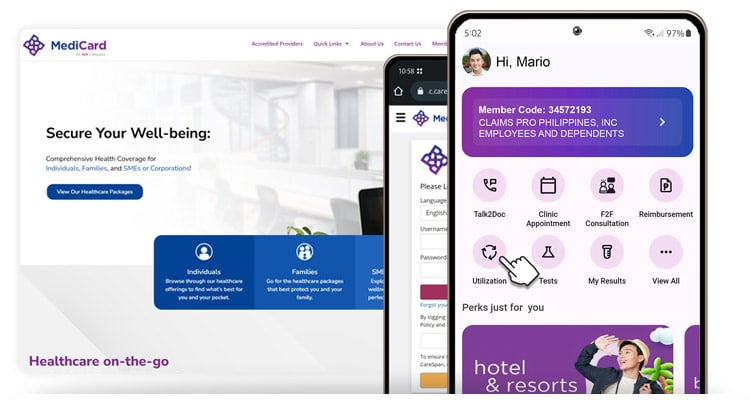
Source: https://www.medicardphils.com/
MACE was MediCard’s previous mobile application for member services. It has since been retired and replaced with the updated MediCard GO app. Members are encouraged to fully migrate to the app to track outpatient benefits or book digital consults. You can also visit the MediCard website or the MediCard online LOA portal.
The modern framework relies on two distinct digital entry points depending on the urgency and nature of the medical request.
How To Request For Online Consultation On MediCard GO?
On mobile, open the app on your smartphone, log in, and go to the central dashboard. Select the Get LOAs option.
Complete the online form. Select your specific consultation reason from the drop-down menu and choose an available physician from their directory.
Personal information and detail mismatches will flag the application request under “verification failure.” So, be sure to confirm details like your active email profile and active mobile number (basically, email and SMS), and match them to the exact corporate registry records (provided by your employer). That way, you avoid pushing your request to a manual, delayed human audit.
PhilCare Letter of Authorization Explained
It’s HeyPhil DigiMed for PhilCare. They provide online consultations through this app, which lets members book teleconsultations. However, certain app services are available only to certain HMO plans. Options may vary among plans, like Single-Use DigiMed Consult or Unli-DigiMed Consult.
How to Get a Letter of Authorization From PhilCare?
To send the request yourself (and avoid corporate HR delays), follow the sequence in the PhilCare app:
- Open the HeyPhil app on your mobile device and tap the DigiMed module on the homepage
- Fill out the Chief Complaint field and describe your symptoms; you absolutely have to do this first, or the booking gets blocked
- Upload photos of current symptom areas and past medical files; past diagnostic printouts, too, if you have them
- Wait for a call about your application progress (no video lobby); also, PhilCare doesn’t have a fixed request processing period, so make sure to leave your line open
- Said call will be from an unknown number, where a PhilCare physician will do a preliminary verbal medical assessment.
After the telephone interview/assessment and consent gathering, your video consultation room gets unlocked on the app.
HeyPhill app is built with an automated module. Rapid primary care resolutions from General Practitioners. Family Medicine. Internal Medicine. Note that “automation” here doesn’t mean you get faster approvals for digital LOAs. It doesn’t expedite requests.
Worth Noting: PhilCare LOAs are not for complex psychiatric evaluations or highly specialized surgical fields. These require traditional corporate HR endorsement and in-person medical reviews.
Extra Read: Speaking of requirements, here are the BIR Registration Requirements for Online Sellers.
Platform Architecture Comparison: Maxicare vs. MediCard vs. PhilCare and How to Get LOA Online
Take a look at the processing times and specialist workflows of the three main providers this article discusses. Visualize how they differ as you compare details on this matrix, to help you choose the best path for your next telehealth checkup or teleconsultation.
What To Do: This table is for primary care that doesn’t require immediate medical attention. If it’s the latter, contact PhilCare’s app or Maxicare’s hotline. To coordinate a complex diagnostic scan at an outside laboratory, use MediCard GO’s advanced booking portal 48 hours ahead.
Extra Read: Here’s something about why you should avail of the Benefits of PhilHealth as a Remote Worker or Freelancer. and how to earn dollars online despite the Middle Class Squeeze/Sandwich Squeeze.
Healthcare Details Are Important, And So Is Your Online Career
You’re doing the right thing, familiarizing yourself with how to get HMO digital LOAs. You’ve been working so hard for so long, and you deserve to know what kind of support you’re getting from your HMO, and how.
But that’s not the only thing that needs clarity. Claim, HMO concierge, and LOA approved? Don’t stop there. Your online career needs a clearer path, too. That’s where Remote Staff comes in. We’ve been pairing remote Filipino professionals with U.S. and Australian businesses. Our job is to match the best Filipino talents and skills with the right global players, with support that continues even after onboarding. Which, by the way, includes payroll, HR, and admin work, is on us.
Empowering yourself with knowledge about your local health infrastructure lets you stay secure and resilient as you nurture your remote career.
Related Read: As you build your online career, get your requirements ready. Here’s the Remote Worker’s Complete Guide to Voluntary SSS, PhilHealth, & Pag-IBIG Contributions.
FAQs About How to Get LOA Online
Does my HMO cover telemedicine consultations on third-party apps?
It depends on your specific HMO plan tier. Providers like Doctor Anywhere allow you to link Maxicare, MediCard, or PhilCare credentials under their “Membership & Health Plan” tab. That said, certain corporate accounts still require a pre-authorized digital LOA or exclude specific specialty rates.
What should I do if my LOA request is denied?
Check the automated email notification for the denial code. You’ll be surprised to know that among the common causes are mismatched member details and typos. Double-check your name, company accounts, and clinical referral notes to make sure they match what’s in the portal’s digital files.
You can also call your provider’s member hotline. They’ll override the system if your primary doctor has deemed the teleconsult urgent.
Are digital prescriptions valid? (Is an e-prescription valid in the Philippines? Do pharmacies accept online prescriptions)
Yes. According to the Philippine Food and Drug Authority (FDA), they’re accepted in major drugstores like Mercury and Watsons. A DOH-DILG-PHIC Joint Administrative Order (2021-0001) supports this. E-prescriptions from licensed Filipino physicians (accredited telemedicine platforms) are legally valid.
See to it that the digital copy shows the doctor’s clear electronic signature, PRC license number, and PTR block.
How long does it take for a digital LOA to reflect in my account?
If you book your consultation through your HMO’s own app, such as MediCard’s Talk2Doc or PhilCare’s HeyPhil DigiMed, your request is often processed right away. However, if it’s with an independent specialist or external diagnostic facility (through Maxicare Member Gateway or MediCard web portals), the application or review may take 24 to 48 hours.
Tap Into Digital Healthcare By Knowing The Rules
Digital healthcare and online consultations in the Philippines aren’t about comparing apps with the most impressive-looking interfaces. It isn’t even about popularity and mentions on socials. It’s about knowing the ins and outs of authorization and the application guidelines of the provider.
And yes, the best telehealth services do offer a more seamless transaction compared to face-to-face consults, where queueing is almost a must (in most areas). But you’re already beyond recognizing this.
Where you’re at is a step beyond: getting your online HMO Letter of Authorization cleared and becoming HMO compliant before you “set foot” in any virtual waiting room.
As you master the requirements of your HMO provider, reach out to us and explore your options for a global career.