
In This Blog:
Typing. Copy-pasting. Folder and sheet organizing. Google Workspace administration. Microsoft 365 administration. Skills most Filipino virtual assistants can do with their eyes closed.
Good skills.
Only now, you’re ready for more.
The Philippines is home to more than 1.3 million virtual assistants. That number makes up 13% of the global workforce.
But when you want your resume to get more than the average 8 seconds of a recruiter’s attention, it’s time to think about giving yourself a new title and earn it: how to become a Technical Virtual Assistant.
English. Reliability. Work ethic. Those qualities built the Filipino VA industry, and they’re still valuable today. What happens when you pair them with newer, in-demand skills like CRM integration and workflow automation?
Because while plenty of VAs can manage the work, far fewer can improve the systems behind it. That’s where you stop working through the system and start shaping it.
What is a technical virtual assistant? (What is a tech va?)
A technical virtual assistant, or a Tech VA, is a virtual assistant who helps businesses improve and manage the systems behind their day-to-day operations. Instead of only completing tasks manually, they work with tools and workflows to make processes more organized and efficient. Technical VAs often handle CRM management, platform connections, workflow setup, and business automation.
What Does a Technical VA Do? (And Why the Global Market Pays More for It)
Instead of handling tasks one by one, Technical VAs set up the processes that handle those tasks in the first place:
Build CRM (Customer Relationship Management) sales processes. Create automated follow-up sequences. Sort leads into the right places (lead routing). Group contacts by customer type, behavior, or stage in the buying process (contact segmentation). Get specific apps to work together (platform integration). Keep customer data organized on the backend.
All these, with no constant manual input. The technical VA understands systems. How customer information flows, how software connects, how processes break, and how to reduce manual work across an entire business.
Here’s the difference in VA roles and rates:
*AI tool familiarity alone adds 20–30% to rates.
Western clients, whether in Australia, the U.S., or the U.K., run a good chunk of their business through HubSpot, Zapier, GoHighLevel, ActiveCampaign, and similar platforms. They’ve bought in, whether it’s the tools themselves or expensive monthly subscriptions and upgrades.
But they’ve never fully set them up.
Or they use those platforms at 20% of their capacity.
Business owners should focus on running the business. They need someone to link those systems up and keep them moving in the right direction. That someone? Your future self, and the answer to how to become a technical virtual assistant.
Related Read: Here’s a Guide to Applying for a PAG-IBIG Housing Loan and a Guide to Getting Your TIN ID.
What Technical Virtual Assistant Skills Should You Have?
Let’s talk skills and what’s worth learning. There’s a combination of technical virtual assistant tools. Not necessarily a list. The combination defines and distinguishes a tech VA from a general one. Here’s what international clients immediately recognize in a hire, and gladly pay a premium on.
#1. Your Foundation: One CRM Platform
Pick one CRM platform. It’s your main corner. Become more than fluent in it: master it.
GoHighLevel (GHL)
Currently the most-posted-for CRM in Filipino VA job listings. Considered an all-in-one platform, through GoHighLevel, you handle CRM, email, SMS, funnels, calendars, and sub-account management (overseeing different client workspaces).
Popular international agency and coaching niches have GoHighLevel in bold. Ironically, fewer VAs in the Philippines are knowledgeable about it. It’s relative to demand. That’s why it’s perched on a higher pay bracket.
No formal online academy for this, but you’ll find extensive community resources via YouTube tutorials.
HubSpot
The most recognized CRM brand among US/AU/UK SMBs. They have a Free CRM tier available. HubSpot Academy is free and globally recommended. Learn about how inbound marketing, sales pipelines, journeys, and contact management work within the platform.
The Academy is a good place to start. Even better for you if your target clients are B2B companies.
ActiveCampaign
Email-first CRM. You’ll find ActiveCampaign common in online e-commerce courses. Your advantage: a lower learning curve compared to the first two above. If your existing clients, or would-be clients, use it, that’s your way in.
What To Do: Don’t try to learn all three. Not all in one go, anyway. Choose based on the type of clients you’re eyeing or are with. GoHighLevel for agencies and coaches. HubSpot for corporate SMBs and B2B businesses. ActiveCampaign for e-commerce or course creators.
#2. Your Leverage: One Automation Tool
If there’s one skill that’ll spare you hours of repetitive work while strengthening your resume, it’s being able to hold your own in an automation tool.
Zapier
Among the most widely used automation tools. Zapier connects as many as 6,000+ business apps, from CRMs and email marketing tools to spreadsheets and project management tools. It automates the flow of information between those apps, reducing the need for repetitive manual work.
For Technical VAs, Zapier is often the first stop in automation learning because of its wide adoption and relatively low learning curve. Most business owners also recognize the name.
Make (formerly Integromat)
More powerful than Zapier for complex logic. Make has a steeper learning curve. Where Zapier provides a simple, step-by-step approach, Make gives users more control over how data moves and branches between apps. More leeway for customisation. Which also means it’s more complex to learn.
This one’s common in tech-forward businesses.
n8n
Open-source, self-hosted option. n8n is still niche, but growing. Clients who use n8n are usually technical and pay well.
Once you’re comfortable building multi-step Zaps, connecting Zapier to ChatGPT via its OpenAI integration is usually the next step clients in content, sales, and support roles pay a meaningful premium for.
What To Do: If you’re at zero, learn Zapier first. It’s the most recognizable name in client job posts. Layer in Make once you have clients, when you’ll encounter workflows that become easier to build in Make.
#3. Integration Between the Two (Your Proof of Build)
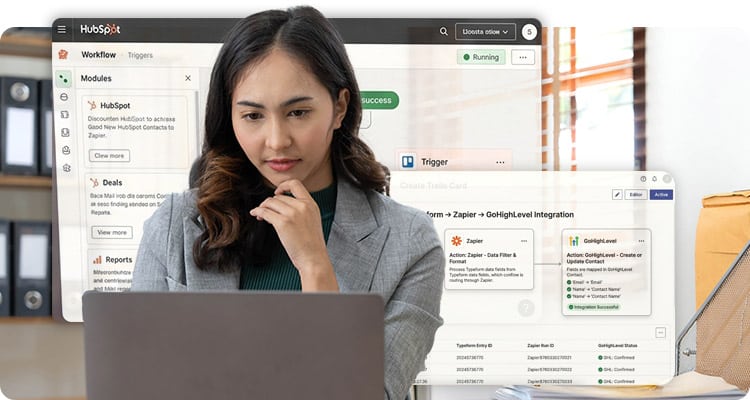 This is the differentiator: you need to build something that connects your CRM to your automation tool and removes a step that would otherwise have to be done by hand. It tells clients you’ve done more than finish a course.
A few examples of what that looks like:
- A new HubSpot contact triggers a Zapier workflow that sends a personalized Slack message to the sales team and logs the contact in a Google Sheet
- A Typeform submission routes through Zapier into GoHighLevel, tags the contact, and starts an email sequence
- A WooCommerce purchase triggers Make to update the CRM, send a welcome email, and notify the fulfillment team
Each of these solves a real problem a client is dealing with right now. It’s the standard to hold your builds to.
CRM Tools Comparison Table:
5 Free Technical Virtual Assistant Platforms Worth Your Time
What you need to become a tech VA is free. Most of it. But cost is inconsequential to committing to sharpening your edge by broadening your skillset and being smart about where to look to do that.
Watching until you feel ready? Then “ready” will never happen. You have to take the plunge first. Here are the recommended five where learning’s free.
HubSpot Academy
The learning is what you get from it, but the bonus is the certification. HubSpot Certifications are globally recognized. They’re listed as a requirement on many job posts today. Enroll for the HubSpot Marketing Software certification. Do the CRM Data Migration certification after. Both are practical and self-paced.
Zapier’s Learn Portal
You’re dealing with a learning platform built in-house by Zapier’s own team. “Zapier for Beginners” and “Automate Your Work” are the two courses that belong at the top of your list. The modules are structured. What you learn is immediately applicable to client work.
Make Academy
Make’s scenario-based training takes place inside the Make interface. You’re building while you learn. Right there. Within the platform itself. Hands-on. By the time you finish a module, it’s like you’ve experienced the work that goes on on the platform.
Because you have.
YouTube
YouTube belongs on this list, too. You’ll be amazed at how many in-depth tutorials there are on the video hosting and sharing platform. The problem is there are too many of them, and you don’t want to waste too much time scouring through which ones are worthwhile and which ones aren’t.
Three channels to consider: Layla at ProcessDriven for HubSpot and ClickUp workflows, and Ben Tossel for Make and no-code automation. The official HubSpot channel for feature-specific walkthroughs. Use it for those extra details after you’ve gone through the structured courses.
GoHighLevel Community + HL Pro Tools
No equivalent to HubSpot Academy, but the Facebook community and HL Pro Tools tutorials are extensive. Practitioners share their builds, troubleshoot live problems, and post client use cases. More useful than most paid courses once you’re past the basics.
A Note on Salesforce
Eventually, you’ll hear the name. Either that, or you already have. Salesforce is one of the biggest CRM platforms in the world and is heavily used by large companies.
It’s not something a beginner Technical VA should be too concerned about. The learning curve is a lot steeper, and most small business clients you’ll encounter are more likely to use HubSpot, GoHighLevel, or ActiveCampaign. But if you end up working with enterprise clients later on, Salesforce is one of those names that tends to follow you throughout your career.
Related Read: Find out more about How to Make Dollars Online, and why Filipinos are joining the global workforce fast.
Learning Order & Timeline: Don’t Waste Six Months on the Wrong Tech VA Course
Most upskilling content gives you a list of tools and leaves you to figure out the sequence yourself. However, sequence is the thing.
You don’t want to waste hours on a course that could’ve been completed later than a more crucial one. You also don’t want to force your way into understanding an intermediate course when you haven’t gone through the basics yet.
Here’s the four-phase roadmap you can follow in your learning.
#1. Weeks 1 to 3: Learn One CRM
Still unsure which platform to start with? Do HubSpot. Complete the free certification, then spend another two or so weeks using a free account. Create and add fake contacts. Create a basic workflow. Set up a simple sales process, then mess it up on purpose so you’ll learn how to trace it back to the source problem.
It’s self-led training, without worrying about a manager hovering over your actions or a client who’ll give you bad feedback.
#2. Weeks 4 to 6: Learn One Automation Tool
It’s Zapier in second. Complete their beginner course. After, build at least five Zaps that connect real tools: Gmail to a Google Sheet, a form submission (lead capture forms) routed into a CRM, a Slack notification that fires when a deal stage changes, or a calendar booking that automatically creates a contact record.
Each one should solve a “manual” problem, even a small one. Don’t automate random things just because you can. The automation should solve a real problem.
#3. Weeks 7 to 9: Connect Numbers 1 & 2
Build one integrated workflow that uses both your CRM (#1 above) and your automation tool (#2 above) together. Try creating a form submission into HubSpot that triggers a Zapier workflow. It should send a confirmation email, then log the action in a Google Sheet.
Just as important is documenting the steps. Take a screenshot of the setup, along with a Loom recording that walks you through the process of building and explains its purpose.
Bonus: The Loom recording can serve as Proof of Build for your applications. Make it count.
#4. Week 10 Onward: Build Three Portfolio Workflows (Do 3 More #3s)
Number 3 was a trial run. Now, build 3 more. But different. Three workflows that solve a different, hypothetical business problem each. And each with its own Loom walkthrough and screenshot documentation.
That’s 3 more to add to your Proof of Build portfolio.
The certificate gets you the interview, while the portfolio gets you the rate.
You Deserve to Present Yourself Outside Cold Pitches
You’re reading this article, and you’ve been researching how to upskill. That alone says a lot about you and your tenacity to do more and be better at what you do as a virtual assistant. And we’re here for you all the way.
Remote Staff has been pairing Filipino remote specialists with Australian and American business owners for over 18 years. Our clients on the platform are specifically looking for VAs who can handle technical work: CRM management, workflow automation, and platform integration. They’re looking for someone who knows the tools and can handle the rest of the tasks that come with that.
We handle the payroll, HR support, and client matching. You don’t have to do the client-hunting or contract-negotiating. No worrying about clients suddenly backing off or the project stalling. That doesn’t happen to our list of vetted offshore workers.
You just focus on doing what you do.
Related Read: As you prepare yourself for opportunities, here’s something about Philippine Independence Day 2026. Free yourself from peso inflation starting this year.
FAQs on How to Become a Technical Virtual Assistant
Do I need a tech or IT background to become a tech VA?
No. Where IT roles generally handle software troubleshooting, website maintenance, and similar responsibilities, the tools covered in this guide, such as HubSpot, Zapier, and Make, are designed for non-developers. They use visual interfaces and plain-language triggers. Certain platforms have higher learning curves than others, but a background in tech is definitely not a requirement.
How long does it take to transition from General VA to Tech Virtual Assistant?
Ten to fourteen weeks if you follow a structured learning path and commit to building real workflows. And this is outside the time you watch tutorials. The roadmap in this guide is specifically sequenced so you’re coming up with something functional by week seven.
Are HubSpot Academy certifications recognized? Is a HubSpot Academy certification enough to charge higher rates?
It’s recognized globally. Though the certification helps, it’s not always the deciding factor. What clients pay for is demonstrated capability. Our example of creating a Loom video showing a workflow you built inside HubSpot is more convincing than the certificate alone. Get the certification. Then do the build and document / record it.
Is it possible to get clients as a Tech VA without prior experience?
Yes, it is, especially if you’ve had experience as a General VA first. Still, even if you don’t, three portfolio workflows using free tools will help. Record a Loom walkthrough of each and add them to your portfolio, as well as to your Remote Staff specialist profile.
Beyond General Virtual Assistance
The difference often comes down to the kind of work you can take on. When you can build a CRM, automate routine tasks, and connect software, you no longer have to compete for the same jobs as every other general VA.
The technical side of it? Learnable. Your Proof of Build without work experience? Buildable as you learn and do something hands-on from course to course. The path from general admin work to tech VA is ten weeks of focused learning, and most of the resources to get there are free.
The rate you charge is a direct reflection of the problem you can solve.
Start with one CRM. Build something real. Document it. The skills that make a great general VA are the same skills that make a great Technical VA. The difference is what you choose to add next.
Ready to put your automation skills in front of clients already looking for them? About to upskill as an IT virtual assistant, remote technical support, or technical support specialist? Register with Remote Staff and connect with AU and US businesses actively hiring Filipino remote specialists.